
CharmPass
MTA ITTravel & Local
4.51.36K Reviews
- Version
- 3.21.7458
- Installs
- 100.00K
- Age Rating
- Everyone
Screenshots
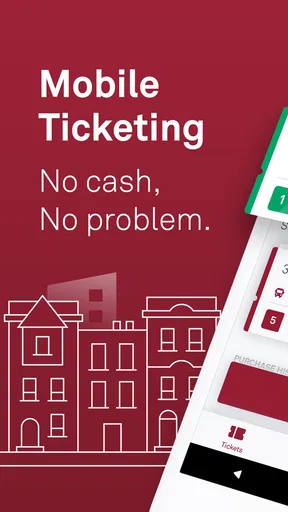
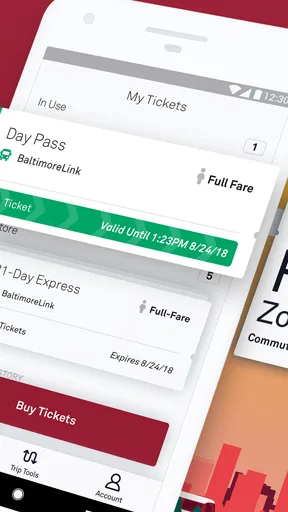
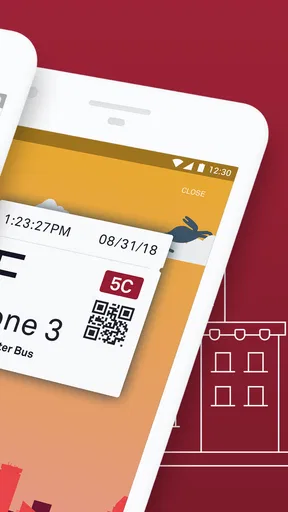
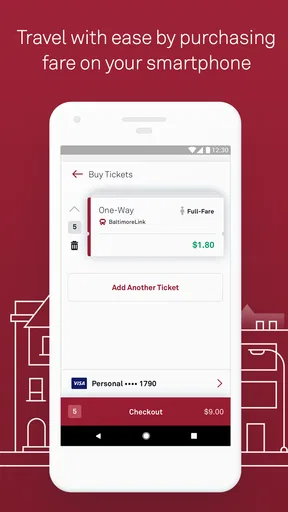
Our Review of CharmPass
 Analysis by Appyee
For anyone who regularly rides Maryland’s public transportation, CharmPass is the kind of app that can quietly remove one of the most annoying parts of a trip: finding and buying a ticket at the last minute. I found it most useful when I already knew I needed MDOT MTA service and wanted the ticket on my phone before boarding. It is free to download, aimed at everyone, and comes from MTA IT, so its purpose is refreshingly focused rather than trying to become a general travel planner.
My overall view is positive, with one important qualification. CharmPass works best as a digital ticket wallet for MDOT MTA riders, not as a complete replacement for every transit tool. If your main concern is purchasing and presenting a mobile ticket, it makes sense. If you need broad trip planning, a unified system covering unrelated transportation providers, or a dependable backup when your phone is nearly unusable, I would not rely on it alone.
What using CharmPass feels like in everyday travel
The first thing I noticed is that the app’s value depends less on exploring it and more on preparing before a journey. A typical use case is a weekday trip into Baltimore: I open the app before leaving home, choose the appropriate MDOT MTA ticket, complete the purchase, and keep the digital ticket ready for inspection. That is simpler than arriving at a station and beginning the whole process while watching the clock.
That preparation is especially helpful when a station is busy or when I am carrying luggage, coffee, or a child’s hand. Buying in advance lets me deal with the ticket while I still have a stable internet connection and enough time to read the available choices. I prefer that workflow to making a rushed purchase beside a platform, where a small mistake in selecting a ticket can become stressful.
The app’s official role also gives it a clear advantage over improvised alternatives. Rather than searching for a third-party ticketing service or wondering whether a screenshot, email, or printed copy will be accepted, I can keep the purchase in the application intended for MDOT MTA mobile ticketing. That direct relationship is the central reason to install it.
CharmPass is free, which removes the usual hesitation about trying it. The app has earned a 4.5 average from around 3.6 thousand ratings, and its audience is not tiny: it has passed 100 thousand installs. Those figures do not prove that every rider will enjoy the experience, but they do suggest that the app has become a familiar option for people who need this particular service.
The practical advantage is timing, not novelty
Mobile ticketing is not exciting technology, but it solves a real timing problem. I can make the purchase before walking into a station, before boarding, or before leaving work. That matters when the alternative is standing at a machine, handling a physical ticket, or trying to understand a payment screen while other passengers wait behind me.
I also see value in using CharmPass for occasional riders who do not want to learn a complicated routine. A visitor may only need a ticket for one day, while a local passenger may use the app whenever a normal commute changes. In both cases, the app is more useful when treated as a pre-trip checklist item: decide the journey, buy the correct ticket, and open it before the moment of inspection.
One of my more useful habits is to check the ticket while I still have time to correct an error. I do not wait until I am already on board to discover that I selected the wrong option or that the purchase did not finish. That is not a special feature; it is a sensible workflow that makes the app much less stressful. A mobile ticket is only convenient when it is ready before convenience turns into urgency.
Where the app fits beside other travel tools
I would not confuse CharmPass with a full navigation application. General map apps are usually better for comparing walking routes, checking connections across different transport modes, or planning an unfamiliar journey from door to door. CharmPass has a narrower job: handling MDOT MTA mobile tickets. That narrower focus is a strength when I already know what service I need, but it becomes a limitation when I am still deciding how to travel.
Physical ticket machines remain a useful alternative for people who do not want to use a phone, do not have enough battery, or prefer a visible paper transaction. A stored-value or contactless approach may also feel easier for riders who make many short trips and do not want to think about opening an app before each journey. CharmPass is most convincing when the phone is already part of the travel routine and the rider values advance preparation.
I would also keep a normal route-planning app nearby. CharmPass may handle the ticket purchase, but I still want another tool for directions, walking time, and deciding where to transfer. Using two apps is not necessarily a flaw, because they serve different purposes, but new users should understand the distinction before expecting one application to manage the entire trip.
Small habits that make mobile tickets less frustrating
There are a few practical details I would recommend to a first-time user. First, do not begin with a purchase while rushing toward a vehicle. Open the app earlier, review the ticket choice, and make sure the ticket is visible before boarding. This gives you time to deal with a slow connection or an accidental tap without turning a normal ride into a last-second scramble.
Second, keep your phone charged on days when you expect to travel. A digital ticket is convenient only while the device can display it. A battery-saving routine can help, but it is still wise to think about the phone as part of the fare process rather than merely as a map. I would not delete the app immediately after a journey either; keeping it available makes the next purchase quicker and avoids reinstalling it when already in transit.
Third, read the ticket details rather than assuming that every option means the same thing. The most important choice is not how fast I can tap through the screens; it is whether the selected ticket matches the journey I intend to take. This is where CharmPass rewards a calm, deliberate purchase more than a hurried one.
Finally, I would open the app before entering an area where connectivity may be inconvenient. Preparing early is more reliable than waiting until the platform or vehicle. That single change in routine is, in my experience, more valuable than any cosmetic convenience the application offers.
The meaningful weakness: dependence on the phone and the user
The main weakness is built into the format. CharmPass puts the ticket on a personal device, so the rider becomes responsible for keeping that device available and presenting the correct purchase. A person who forgets a passcode, runs out of battery, loses access to the phone, or waits until the last moment may find the digital method less convenient than a machine or physical ticket.
This also means the app does not remove every kind of uncertainty. I still need to know which ticket to buy, when to activate or display it, and whether the phone is ready for inspection. The application can simplify payment, but it cannot make an unfamiliar transit system completely self-explanatory. New riders should allow themselves a little extra time for the first purchase.
Another limitation is the app’s narrow scope. If I am planning a complicated outing involving several transportation providers, I would rather begin in a route-planning tool and use CharmPass only for the MDOT MTA portion that requires a mobile ticket. Expecting the ticketing app to replace maps, schedules, and broader travel research would lead to disappointment.
There is also a human trade-off. Some people feel more secure holding a physical ticket, while others dislike managing several travel apps. For them, the small convenience of digital purchasing may not outweigh the need to monitor a phone. I would not recommend switching purely because mobile tickets sound modern; I would recommend it when the specific problem is avoiding a ticket machine or preparing a fare before leaving.
Who should install it, and who should choose another method
CharmPass is a strong fit for regular MDOT MTA passengers who already carry a smartphone and want to buy tickets before reaching the station. It is also useful for occasional riders who prefer not to handle cash or search for a machine during a busy trip. Visitors can benefit from it when their journey is already clear and they want the ticket process separated from route research.
I think it is particularly suitable for commuters whose schedules change. If I leave work at an unusual time, travel during a crowded event, or need to make a quick trip after an appointment, having the official ticketing app ready can reduce one step from the departure process. The benefit is not that it plans my entire day; it is that the fare is easier to arrange when the day does not go according to routine.
Families may also find it practical, although I would be careful when purchasing several tickets. Before completing the transaction, I would check that each ticket corresponds to the intended passenger and journey. Managing tickets for more than one person can be convenient, but it also creates more room for selecting the wrong option or presenting the wrong ticket at the wrong time.
I would suggest a different approach for riders who rarely use MDOT MTA and do not want another application on their phone. A ticket machine or another accepted purchase method may be simpler for a single trip, especially if the rider is uncomfortable with digital payments. The same is true for anyone whose phone battery is unreliable or who does not want a fare tied to a device.
People who need extensive accessibility planning, detailed navigation, or information covering many transport networks should pair CharmPass with a broader travel resource rather than treating it as their only travel companion. The app can be part of a good system, but it is not necessarily the whole system.
Device support, maturity, and everyday confidence
The application supports Android devices running version 6.0 or later, which makes it available to many older phones as well as newer ones. Its current version is 3.21.7458. I would still keep the app updated when an update is offered, because ticketing software needs to remain compatible with the device and the service it supports.
CharmPass was released on September 26, 2018, so it is not a brand-new experiment. That history is reassuring in a modest way: the app has had time to become an established part of the MDOT MTA mobile ticketing experience. At the same time, a mature app can still feel utilitarian. I would judge it by whether it helps me buy and display the right ticket, not by whether every screen feels as polished as a social or entertainment app.
The Everyone content rating is appropriate for a transportation utility. There is no learning curve based on entertainment features or unnecessary social interaction. The app’s value comes from being ready when I need it, which is why I would install it before a planned journey rather than downloading it while already standing at the boarding point.
In practical terms, I would test the basic flow on a low-pressure trip first. That lets me become familiar with the ticket choices and the way the purchase appears on the phone. After that, the application becomes much less intimidating because the important sequence is already familiar: open it, choose carefully, finish the purchase, and have the ticket ready.
My final assessment of CharmPass
After looking at how it fits into real travel, I see CharmPass as a focused and worthwhile tool rather than an all-purpose transportation solution. Its strongest quality is directness: it is built by MTA IT as the official mobile ticketing app from MDOT MTA, and it addresses a specific inconvenience without asking the user to adopt a larger travel ecosystem.
The trade-off is equally clear. The app cannot compensate for a dead phone, a rushed purchase, or uncertainty about the correct fare. It also does not replace a map or a full journey planner. Those are meaningful limitations, but they are manageable when I use the application for what it does best and keep another navigation option available when needed.
I recommend CharmPass to MDOT MTA riders who want to prepare their ticket before travel and are comfortable relying on a charged smartphone. I would skip it if I take only one rare trip, prefer physical tickets, or need one tool to plan every part of a multi-provider journey. For its intended audience, though, the free price and focused purpose make it an easy app to try, and the strongest benefit appears in the ordinary moments when avoiding one queue or one rushed purchase makes the whole trip feel smoother.
Verdict
Strengths of CharmPass
- Buy and validate transit tickets directly from your phone.
- Useful for managing several journeys without carrying paper tickets.
- Shows available fares and transport options in one place.
- Digital tickets can be accessed quickly during inspections.
- Saves time by avoiding ticket-machine queues at busy stations.
Limitations of CharmPass
- Requires a compatible smartphone with sufficient battery during travel.
- Coverage and available features may vary by participating transport network.
- Some tickets may need mobile data or location access to work properly.
- Account or payment setup can take time before the first purchase.
- Refunds and ticket changes may depend on the transport operator’s rules.
Similar Picks in This Category
View All
Google Maps
Google LLC3.4

Google Maps Go
Google LLC4.1

Booking.com: Hotels & Travel
Booking.com Hotels & Vacation Rentals4.8

Google Earth
Google LLC3.8

Skyscanner Flights Hotels Cars
Skyscanner Ltd4.8

trivago: Compare hotel prices
trivago N.V.4.4
Frequently Asked Questions
What is CharmPass and what can I use it for?
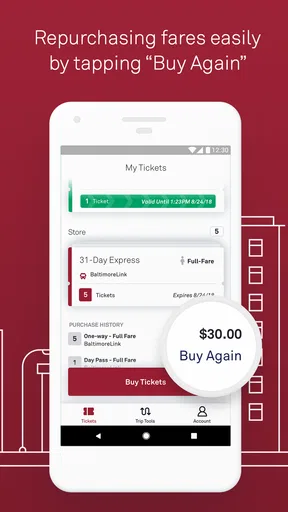
CharmPass is a mobile ticketing application designed for public transportation in the Baltimore area. After installing it, users can browse available fares, purchase tickets or passes, and display a valid mobile ticket when boarding or entering a transit facility. It is intended to make daily travel more convenient by reducing the need for cash, paper tickets, or visits to a ticket machine.
Which transportation services and tickets are supported by CharmPass?
CharmPass primarily supports participating Maryland transit services, including options associated with the Maryland Transit Administration, such as local buses, Light RailLink, Metro SubwayLink, MARC Train, and other eligible services depending on the current fare program. Available ticket types can vary by route and service, so it is important to check the app before purchasing to confirm that the selected fare is valid for your intended trip.
How do I purchase and activate a ticket in CharmPass?
To purchase a ticket, open CharmPass, choose the relevant transit service and fare, then complete payment through the available in-app checkout options. Some tickets activate immediately, while others may require you to activate them before boarding. Because activated tickets may begin their validity period at once and generally cannot be undone, review the fare, date, and passenger details carefully before confirming.
Can I use CharmPass without an internet connection?
You generally need an internet connection to sign in, browse fares, make a purchase, and retrieve newly purchased tickets. Once a ticket has been downloaded and activated, the app may continue displaying it temporarily without a strong connection, but this should not be treated as guaranteed offline access. It is best to open the ticket before arriving at the station or vehicle and keep your phone charged.
What should I know about refunds, transfers, and showing my CharmPass ticket?
CharmPass tickets are normally checked directly from the app, so your phone must be available and the ticket must be clearly visible when requested by transit staff. Rules for transfers depend on the fare purchased and the participating service. Refunds, cancellations, and ticket corrections may be limited, particularly after activation, so verify the route, fare type, and travel time before payment and contact official customer support if a problem occurs.
